

The word Compute basically means where the application is deployed and running. This could be your personal computer, serverless functions (e.g. AWS Lambda), virtual machines (e.g. Amazon EC2) or container services (e.g. AWS ECS/EKS).
General Thoughts on Compute Selection
If you’re working in a company, the selection of compute is generally influence by what’s being already being used in other projects/services. This is because the team already has experience managing certain technology. Introducing new services brings in learning curve and extra operational burden.
For reference, the comparison of services is corresponding to AWS cloud but they hold across the cloud providers.
Let’s start the discussion, starting with virtual machines.
Elastic Compute Cloud (EC2)
There are two options with Amazon EC2. A shared tenancy or dedicated tenancy. The idea is you wish to buy the entire physical server or just a part of it. Most of needs are served with shared tenancy, don’t worry the customers workloads are properly isolated.
Once you decided on the tenancy (default is shared), the second choice you’ve to make is instance type. This depends on a variety of factors such as:
Hardware and performance characteristics of an instance such as CPU, disk, memory and network.
Type of workloads such as huge AI training workflows vs running a web application.
The third selection choice you’ve to make is billing model. There are three types, reserved, on-demand and spot instances. The default selection is an on-demand instance.
Reserved: If you’re aware of scaling needs, you can pre-order the number of instances needed. The reserved instances are available at a discounted price.
On-Demand: You spawn the instances when needed and terminate once done. This is default pricing model.
Spot: For less critical workloads where uptime is not a hard requirement, spot instances could be chosen. You can bring up an instance but AWS can terminate it at anytime they wish.
The content of this blog is influenced by Chapter 11 of O’Reilly book System Design on AWS. Checkout the book at https://msdeepsingh.com/books/system-design-on-aws/.

Let’s move to second compute option, containers.
Containerisation Services
The major problem that occurs in development is “it works on my machine”. The development environment could vary from engineer to engineer, from local setup to production environment and so on. This problem is solved via containers.
Another problem addressed via containers is optimising the resource usage on EC2 machines.
You package the application binary with all the dependencies and the same container can run on any machine. You can deploy these container images and manage them on your own but it’s hard job. So there are multiple orchestration tools built on top to manages the containers at scale, such as Kubernetes.
AWS offers two container orchestration services, namely Elastic Container Service (ECS) and Elastic Kubernetes Service (EKS).
Both of these services comes with two forms of deployment, either we can choose to deploy via EC2 or let AWS manage everything behind the scenes (serverless), called as Fargate. Let’s move on to next choice, Function-as-a-Service.
Serverless Functions
You just write functions and don’t worry about underlying infrastructure at all, everything is managed by the cloud provider. For example, AWS Lambda.
The code you write in functions can be invoked with the help of a trigger. For example, whenever there is new object uploaded to S3 bucket, read the object and perform some analysis.
Decision Framework
From earlier blog on this newsletter on choosing a database, the factors are applicable for compute selection as well.

The decision factors include:
Solves the use case
Previous Expertise
Cost
Battle-tested software
Cloud Managed vs Self Managed (Operational Overhead)
Time to Market
With all this information, let’s conclude our discussion.
Closing Remarks…
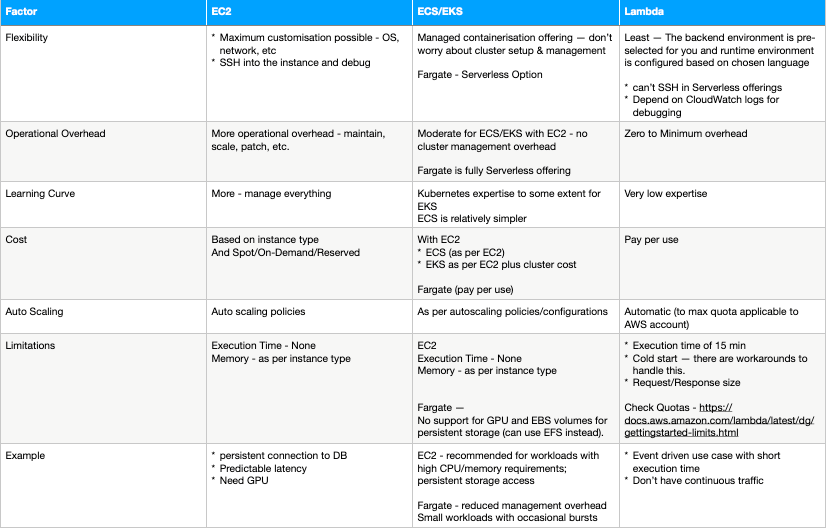
Use the below table as reference for selection of compute along with some decision factors discussed in previous section.
In summary:
All compute options can work at high scale. Evaluate on what works for you. Do PoC if you’ve money and resources.
Iterate on design if you require more control over time.
Example started with EKS Fargate
Move to EKS EC2
Migrate away from managed offering and deploy your own EKS cluster to manage containers EC2 instances.
Taking an example of Amazon Prime video monitoring architecture. The distributed architecture involved multiple AWS Lambda functions orchestrated via AWS Step Functions. This led to lot of operational overhead with extra dollars to spend. The team rearchitected the system by migrating to ECS. This saved cost plus network latency between the components of distributed system.
See you next week! Don’t forget to subscribe :)