


I made a lot of notes during my interview preparation and it was lost in GitHub commit history. These notes were quite helpful during my interviews, specifically for low-level design (LLD) interviews. You can use them as a reference for your interview preparation as well. Best of Luck :)
Few of the concepts are specific to JAVA. I used to write a lot of Java and Kotlin code earlier :)
The information is compiled here basis my understanding by reading multiple blogs/oracle docs/videos and is mostly suitable for interview preparation. You can explore more on internet (some references are also included) for further deep dive.
These are self-written notes without AI help, so don’t expect nice and fancy English. Written in minimal terms for quick revision and reference for interviews.
There are additional code samples in GitHub repo: msdeep14/getAheadWithMe.
Let’s start the discussion with the most basic term, process.
Process
You can think of process as a sequence of steps to be performed to achieve a task. Here are some key details on how processes work on an Operating System (OS).
Process has separate memory allocated space. A process doesn’t share memory with other processes. This ensures complete isolation of processes from each other. In summary, one process’s state don’t impact the state of another process.
Processes interact with each other via Inter process communication (IPC) mechanisms such as Shared Memory or Message passing.
Processes take more time in creation, termination, context switching (in comparison to threads, discussed shortly). Why? Because process has its own Process Control Block(PCB), stack and address space. Separate data segment and code segment is created at each process level.
A process goes through multiple states. These states include
NEW,READY,RUNNING,WAITING,TERMINATEDandSUSPENDED.Process creation requires OS API call - fork(). For example, java.lang.Process for JAVA.
Processes don’t require synchronization between them unlike threads where synchronization needs to explicitly managed to avoid unwanted issues.
There is mention of threads at couple of places above, let’s discuss threads next.
Threads
Think of thread as sub step of a process. A thread can be referred to as a light-weight process. Multiple threads can be created inside a process to carry out specific actions. Here are couple of characteristics associated to a thread.
Threads share the memory space which makes them less latent.
If one thread is blocked within a process, it will also impact other threads in the same process.
Each thread in process has their own stack and register.
A thread can be of multiple types, let’s discuss the thread types next.
Thread Types
A thread can be of two types, user level and kernel level.
User Level Thread: Threads managed by users and created via user-level libraries such as JAVA Thread library.
Kernel Level Thread: Threads managed by kernel. Kernel-level threads are created via OS system calls.
Java Virtual Threads
Light-weight implementation of Java threads. 1 Java Thread == 1 OS thread, which is resource intensive. Virtual threads store their stack frames in Java’s garbage-collected heap rather than in monolithic blocks of memory allocated by the operating system.
A good read - infoQ article. I earlier mentioned there is no need of synchronization for processes but it is for threads. Let’s discuss what I mean from thread-safe.
Thread-safe
Thread-safe class/method/codeBlock means a class/method/codeBlock that can used by multiple threads concurrently without any issues. The output of threads should be same as if they were processed sequentially.
Singleton is class used by multiple threads as a single object exists. The singleton class should be thread-safe. This is also referred to as Double-Checked locking with Singleton. Refer ThreadSafeSingleton class for code implementation.
If the code is not written properly, e.g. one thread block another thread for execution, the situation can lead to deadlock. Let’s discuss deadlock next.
Deadlock
A process/thread is in waiting state because it is waiting for a resource that is held by another process P2. P2 is waiting on another resource held by P3. P3 is waiting for another resource held by P1. All the processes are waiting on each other without being progressing eventually leading to deadlock situation.
Deadlock conditions: All four conditions should satisfy for system to be in deadlock state -
Mutual Exclusion: resources can’t be shared by multiple processes at the same time.
Hold and Wait: holding resource and waiting for other resource.
No Preemption: resources acquired by process can only be released by itself once execution completes.
Circular Wait: processes waiting on each other.
There are ways to avoid being in deadlock situation. If deadlock occurs, the system should get out of it. Let’s discuss them next.
Deadlock Handling
We’ll discuss three techniques for deadlock handling: prevention, avoidance and detection.
Deadlock Prevention: Don't let system enter into deadlock state by avoiding any of the four conditions specified in above section.
Deadlock Avoidance: The resource request is analyzed before-hand to ensure if it can cause any deadlock situations in the future. To perform this analysis, it requires all the information in advance around how resources will be requested/used in the future. Deadlock avoidance algorithm - Banker's algorithm.
Deadlock Detection:
Check process state for deadlock in system.
If
isDeadlock == true, apply algorithm for deadlock resolution.Process Termination: Abort the processes involved in deadlock. This might result in program failures as process might be partially completed. Instead of all process abort, system can look for processes which are of low priority or are running for too long in the system.
Resource Preemption: resources are preempted and allocated to other processes until deadlock is resolved.
Moving on to a similar concept to deadlock, livelock.
LiveLock
The threads/processes are not blocked as in deadlock situation but the state keep on changing from one to another and not making any further progress.
Example:
Queue Message processing: Queue consumer failed with exception and it puts back to queue in hope that it will processed next time but it keeps on failing again and again with same exception. A solution could be to keep a upper limit on number of retries for specific failure if msgs are put into dead-letter queue. Failed msgs should anyway never be put in the same queue again for re-processing.
Starvation
Process in on hold because resources are not allocated to it. This could happen if resources keep getting allocated to high priority threads and low priority threads keep on waiting.
Some ways to avoid starvation situation -
Age of process - If process is too old, it should be given priority for resource allocation even though it is low priority task.
Multi-level feedback queue - geeksforgeeks article
Mutex vs Semaphore
Semaphore
Semaphores can be used to manage access of limited resources(via counting semaphores) or to resolve critical section problem(via binary semaphores).
Refer SemaphoreImpl class for sample example.
Mutex
Mutex = Mutual Exclusion. It is similar to binary semaphore which ensures only one thread can acquire it and access the critical section.
Mutex is a locking mechanism whereas semaphore is signalling mechanism. The context which acquired the mutex lock can only release it but this is not the case with semaphores.
The #1 can prove to be downside if mutex lock is not released as it can’t be unlocked from different context than who acquired it leading to starvation.
I/O Bound vs CPU Bound
I/O Bound: Application is referred as I/O bound if it involves reading/writing from/to input/output system and waiting for information.
The main disadvantage of such applications could be the application can be spending too much time in I/O operations without doing any actual operations. Example - upload/download files.
CPU Bound: Task/process execution is dependent on CPU without requiring any I/O operations. Example - High Performance computing
Blocking I/O vs Non-Blocking I/O
Blocking I/O
The request waits for server to complete its processing. In general terms, the request will wait for read or write before returning back meaning the thread will be blocked state until there is data available for read or ongoing write operation is fully completed.
Blocking I/O operations are available with java.io package.
One byte data at a time -
InputSteamandOutputStreamWrapper for streams -
ReaderandWriter.
Non-Blocking I/O
The request is executed immediately. There could be possibility that request is not processed as soon as it is received, if there are no available threads to process the request, the request is queued(to be processed at later point of time) and response is returned. Other way to look at is if there is ongoing write operation, the thread can perform any other operation.
In analogy to event-driven architecture, you can think of this scenario as communication between service A and service B. service A invokes service B API for some processing and gets a response that request is received by service B. Once the request processing completes by service B, it can publish an event to SNS topic(or Kafka topic) to which service A is subscribed. service A can then perform any additional required processing basis Service B response.
Non-Blocking I/O operations are available with java.nio package.
Read chunks of data at a time -
Buffer.Mapping raw bytes to/from readable characters -
CharsetDecoderOutside world communication -
ChannelEnable multiplexing on a SelectableChannel and provide access to any Channels which are ready for I/O -
Selector.
Volatile/ Atomic Integer/ Synchronized
Volatile Keyword
Volatile keyword is used inside a class to make it thread-safe. It can be used for any variable such as value of it can be modified by different threads at same time without any problem.
It can be used for primitive or object types though it can’t be used with classes/methods.
Volatile keyword enforces to always read variable value from main memory and it is not cached. Both reads and writes will be atomic.
Compiler don’t perform any optimization and order of instructions is maintained.
It can be used as replacement of
synchronizedin specific cases.
NOTE 1 - Visibility problem is created without the usage of volatile keyword. How? Any modification performed by a thread A is updated thread A’s local cache so thread B will still assume previous value of any variable. This can be solved by volatile keyword as volatile enforces to read always from main memory and not from local thread cache.
NOTE 2- volatile can be used to resolve visibility practice, prefer to use it for setting flag variables. For compound operations or counters, prefer AtomicInteger/AtomicLong/AtomicReference.
Atomic Integer
java.util.concurrent.atomic.AtomicInteger. Refer the sample example and comparison of volatile, AtomicInteger and synchronized keyword in class VolatileKeywordImpl.
AtomicInteger count = new AtomicInteger(1);
Operations available with AtomicInteger -
incrementAndGet
decrementAndGet
addAndGet(int delta)
compareAndSet(int expectedValue, int newValue) - Type of optimistic locking.
NOTE - AtomicReference provides atomic operations on underlying object reference variable.
Synchronized
Synchronized keyword over a method or block of code ensures only single threads access it at a time avoiding race conditions.
Refer SynchronizeSample class for example.
Any object in synchronized block is placed inside a lock(lock acquired on start of block and released at end of the block). The lock is internal monitor which is responsible for checking synchronization.
Synchronized keyword should not be used with constructors/variables.
Locks
Locks can be used to ensure single thread access the critical section at a time. Think of lock as a guard to critical section and this guard provides key to enter the critical section and while leaving critical section, handover this key back to guard. Java Lock is similar to synchronized block discussed in above section.
Reentrant Locks
private static Lock lock = new ReentrantLock().
synchronized is implicit lock and locks are explicit. We need to specifically define variable to create a lock and use it in the code block.
You can acquire the lock in one method and release in another method. There is no such flexibility in synchronized keyword.
tryLock() method with Locks which can be used to check if lock is available.
ReentrantLocks allows to call lock.lock() multiple times without calling unlock(). Finally you can unlock() for the number of times lock() was called.
getHoldCount()can be used to check how many times to lock() is called.To make the lock fair, use
lock = new ReentrantLock(true). This ensures that longest waiting thread gets the lock. Fair locks can be little slower as an extra queue needs to be maintained based ageing. Unfair lock could be faster, but it can potentially lead to thread starvation in some cases.tryLock() doesn’t honor lock fairness. To make it fair, use
lock.tryLock(0, TimeUnit.SECONDS).
Refer LockSample class.
ReadWrite Locks
Reentrant locks can be inefficient if there are threads blocked which only want to read some data. ReadWriteLocks helps to optimize this kind of use-case.
Reentrant lock - one thread at a time.
ReadWrite lock - one writer thread at a time OR multiple reader threads at a time. Key Point - Both read and write threads will not be given permission simultaneously, either one of them can execute at a time.
ReadWrite lock can be efficient for use-cases which requires high number of reads and less writes in general.
Refer ReadWriteLock class.
Optimistic and Pessimistic Locking
Pessimistic Locking - Lock the object beforehand performing any operation. Java synchronized keyword is example of pessimistic locking. It has extra performance bottleneck as threads have to wait unless permitted to execute specific operation.
Optimistic Locking - As name suggests, in this approach you can go ahead and execute the operation with assumption that no other thread will interfere. It relies on collision detection and handle if detected via retry/failure. Java CompareAndSwap is example of optimistic locking.
Two-Phase Locking
Locking and unlocking has two phases -
Growing Phase - Locks are obtained but not released.
Shrinking Phase - Locks are released but no new locks are obtained.
This ensures serializability but can cause deadlock, starvation and cascading rollback.
The last lock acquired in growing phase is referred as Lock Point. Lock Points are used to define serializability, example basis lock point you can identify which transaction comes first in series of transactions.
Phaser, CountDownLatch and CyclicBarrier
Read more on oracle docs. Here is the summary of these terms.
CountDownLatch
This is helpful in scenarios if there is requirement to initialize some piece of code before executing further system logic or other threads. Think of a scenario, where database connection to be established before other threads can actually carry out the db query operations.
Refer CountDownLatchSample class.
CyclicBarrier
Set of threads wait for each other to reach a common barrier point. and once common point is reached, then all the threads can carry forward their execution.
Why cyclic? The same barrier can be used again and again among the threads.
Phaser
It is similar to CountDownLatch with some added functionalities. Phaser allows dynamic number of threads that needs to wait for continuing execution, in countDownLatch, we specific fixed number of parties upon initialization.
register() - party can register itself
bulkRegister() - extra parties register in bulk
arrive() - parties can arrive and continue
arriveAndAwaitAdvance() - parties can arrive and await for other parties.
arriveAndDeregister() - Parties can arrive, deregister and continue.
Conditions
Take an example of Thread-1 and Thread-2. Thread-1 complete execution in two stages. Stage-1 and Stage-2. Stage-1 is executed and the execution of State-2 is dependent on completion of Thread-2. In such scenarios, Thread-1 will put an additional condition condition.await() to put thread in blocked state. Once Thread-2 execution is completed, it will run condition.signal() or condition.signalAll() and with this signal all the threads which are blocked on this condition will carry forward their execution.
This is similar to monitor.wait() and monitor.notify() in synchronized code block.
Refer ConditionSample class.
wait(), notify() and notifyAll()
wait(), notify() and notifyAll() can be used in replacement of conditions. They can be applied on any java object.
wait() - similar to myCondition.await()
notify() - similar to myCondition.signal()
notifyAll() - similar to myCondition.signalAll()
Refer MyBlockingQueue class and MyBlockingQueue2 class for sample examples.
ExecutorService
1 Java Thread == 1 OS Thread
How to run tasks in parallel? via using Thread class.
for(int i=0;i<1000;i++) {
   Thread thread = new Thread(some Runnable);
   thread.start();
}
The above operation will be too expensive as 1000 threads are being created at the same time which could lead to system crash.
To solve this problem, you can create a pool of threads and submits the large list of tasks to them. Now the tasks can be picked up as there are free threads present in the thread pool which are being maintained in a BlockingQueue.
Example - ThreadPool size = 10, even though submitted task size = 1000, the system will execute max 10 tasks at a time.
   ExecutorService service = Executors.newFixedThreadPool(10);
   for(int i=0;i<1000;i++) {
      service.execute(Runnable task);
   }
submit() vs execute()
submit()execute()return type is Futurereturn type is voidBoth Runnable and Callable can be passedRunnable task can be passed as input
ThreadPool Types
FixedThreadPool - initialize thread pool with fixed number of threads.
CachedThreadPool - tasks are held in synchronous queue. It will check if there are already available free threads, if yes then use one from available else create a new thread and assign task to it. This threadPool kills the idle threads with lifecycle more than 60 seconds.
ScheduledThreadPool - tasks that are required to be submitted after certain delay or require scheduling. It stores the tasks in delayQueue which stores tasks basis when these tasks should be executed(priority order is basis that).
service.schedule(Runnable, delay:10, SECONDS). Task will be enabled after 10 seconds.
service.scheduleAtFixedRate(Runnable, initialDelay:15, period:10, SECONDS). First task will start after 15 seconds. Subsequent tasks will execute at initialDelay+period, then initialDelay+2*period, and so on...
service.scheduleAtFixedDelay(Runnable, initialDelay:15, delay:10, TimeUnit.SECONDS). First task will start after 15 seconds. Once this is completed, second will start after 10 seconds of 1st task completion.
SingleThreadedExecutor - similar to FixedThreadPool with
numThreads=1
Future
Placeholder for value that will arrive sometime in the future.
To get actual response of
submit(), usefuture.get().get() is blocking operation - it will wait until the thread result is returned. We can use
future.get(1000, TimeUnit.MILLISECONDS)to specify a timeout value for it to be blocked state if result is not available.
Runnable vs Callable
Runnable return type is void whereas Callable can return a value.
Refer RunnableVsCallable class for example.
CompletableFuture
Assume you’ve used a for loop to gather all the results from callables.
There is possibility that as your iterate over future list, not all futures are computed at a moment.
In such scenario, the thread will blocked for time being until the future result arrives for specific thread.
There can be a case in which you’re waiting at 4th thread whose result is not computed yet but results for 10th and 11th thread are already in.
But since you’re iterating in for loop, you’ll still be blocked on 4th thread.
How can you overcome this?
use timeout value on
future.get(1000, TimeUnit.MILLISECONDS)use CompletableFuture to run threads independently.
Use ExecutorCompletionService - helps in processing the threads as their execution completes.
CompletableFuture helps to run a series of tasks on a separate thread than the main thread. Consider an example of uploading a youtube video on @MsDeepSingh channel, what are the steps.
upload video file from local store.
run validation checks
upload in SD format
upload in HD format.
Now these steps should be executed one after another and also there could be multiple users who are uploading videos on their YT channels. CompletableFuture makes it easier to code such pattern with proper exception handling.
ExecutorCompletionService
ExecutorCompletionService helps to retrieve response as Futures finish. Refer ExecutorCompletionServiceSample class for example.
ForkJoinPool
Achieve similar functionality to ExecutorService. ForkJoinPool is optimized for use-cases where tasks creates sub-tasks on the go. Example - mergesort. As the name suggests, ForkJoin consists of two operations -
fork - divide task into sub-tasks
Join - aggregate the result of sub-tasks.
Per-thread queuing - Each thread has their own deque, so all the sub-tasks will be part of this deque.
Work-Stealing algorithm Take a scenario of two threads, Thread-1 and Thread-2. In a scenario where Thread-1 created large number of sub-tasks and Thread-2 has very less number of sub-tasks. Once Thread-2 completes its subtasks, it will subtasks from Thread-1(from other end of the queue) to help out in processing of subtasks. In simple terms, available threads take up tasks from busy threads.
Synchronous Queue
Synchronous queue is similar to blocking queue with size=1. Refer producer-consumer example to understand about blocking queue.
so why do we need a queue with size=1?
There is direct handoff between producer and consumer. The item is not moved to queue. The producer will not be allowed to put item into queue even though the queue is empty. The producer is only allowed to put item to queue once consumer requests for item. Well, technically item is not put into the queue. The item is passed on once consumer thread requests for it.
ConcurrentModificationException
When collection is modified when already an operation is going on. Example, iterating over the list and at the same time removing of an element.
Monitors
Monitors are nothing but implementation of synchronized keyword in JAVA. Monitor is an abstraction that helps to achieve mutual exclusion between multiple threads trying to access a resource concurrently.
Additionally in JAVA, any object can act as a monitor utilizing wait() and notify() methods. Refer MyBlockingQueue2 class for example.
Practice
Producer Consumer Problem
Multiple producers and consumers.
Producer is responsible for generation of new tasks.
Consumer is responsible for executing the tasks created by producer.
Clarifying questions -
What’s the maximum number of tasks that producers can produce? Is there any upper cap? For this problem, assume producers will produce max n tasks and then wait for consumer to consume.
The scale of operation, how many producers? how many consumers?
Approach - Producer
Create a FIFO queue with max size = n
Producer threads will put tasks to queue until full.
Block producer threads if queue capacity is full.
Publish a signal that queue is not empty.
Approach - Consumer
Get tasks from queue if queue is not empty.
Block consumer threads if queue is empty.
Publish a signal that queue is not full anymore once consumer fetches a task.
Dining Philosopher’s Problem
Round dining table where philosophers are sat. There can be two states for them -
Eating
Thinking
They need to make use of forks, philosopher need two forks adjacent to him and starts eating. Problem? The forks are limited, with 5 philosophers there are only 5 forks but philosopher need two forks to start eating, so all philosophers can’t each at the same time.
No philosophers who are adjacent to each other should not eat at the same time.
A philosopher may pick up only one fork at a time.
Philosopher can’t pick fork from neighbour’s hand.
Once philosopher is done eating, he puts back the forks on the table.
Why solve such problem? - Problem of resource utilization and how limited set of resources can be allocated to bunch of processes.
Solution Approach
Each fork is represented by semaphore.
Philosopher picks up fork and put corresponding semaphore to
await()state.Once done eating, philosopher releases both left and right fork with
signal()operation.
//binary semaphore, initialized to 0
Semaphore forks[5];

for philosopher i
do {
    //change semaphore value to 1 ---> java: semaphore[i].acquire();
    await(fork[i])
    await(fork[(i+1)%5])
    //eat

    //change semaphore value back to 0 ---> java: semaphore[i].release();
    signal(fork[i])
    signal(fork[(i+1)%5]);

    //think
} while(true);
Any issues with above approach? Deadlock situation - All the philosophers get hungry at the same time and pick up the left fork. Now all the philosophers are waiting for fork in the right and none of them is actually eating.
Potential solutions -
Allow only 4 philosophers at the table for the table of 5.
Allow philosopher to pick up a fork only if both forks are available. - execute code in critical section - Refer wikipedia blog for Dijkstra’s solution.
Asymmetric solution - odd philosopher picks up first left fork and right fork; even philosopher picks up first right fork and then left fork. This can also be achieved by - All the philosophers pick up their left fork except the last one, so essentially the 5th philosopher will pick right fork first and then the left fork. Refer this implementation in DiningPhilosophers class.
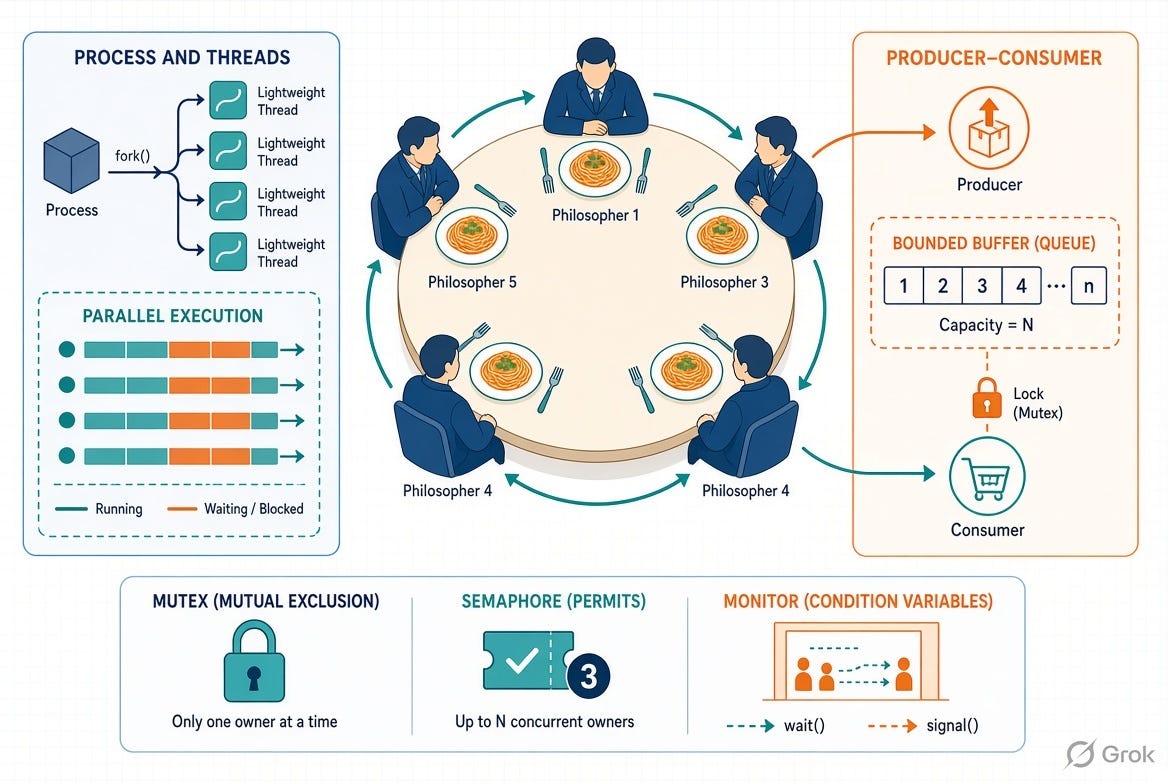
<image generated using Grok>